Spades - Classic Card Game
- 4.7
- Rating
- 100.00K
- Installs
- Free
- Price

 Analysis by App-foxy
If I had to point to one reason to try Spades - Classic Card Game, it would be the ability to play a familiar trick-taking card game without needing an internet connection. That sounds simple, but it changes where the game fits into everyday life. I can imagine opening it during a flight, on a train with unreliable signal, or while sitting with friends who want a quick card game without setting up a physical deck. The appeal is not flashy presentation; it is having a dependable version of Spades ready when the moment appears.
Developed by Mouse Games, this free card game is aimed at players who already know Spades or want a straightforward way to learn it. It is rated for Everyone, works on devices running Android 6.0 or later, and its current version is 1.1.11. The game has built a 4.7 average from around 2.2 thousand ratings, with over 100 thousand installs, which suggests that its uncomplicated approach has found an audience.
Offline Spades is the feature that shapes the whole experience
The most important capability here is offline play. In practice, that means the game is useful in places where online multiplayer games are inconvenient: underground transport, weak-signal areas, travel, waiting rooms, or a relaxed evening when nobody wants to create accounts and coordinate connections. I see it less as a replacement for every form of digital card gaming and more as a pocket version of a game that can start immediately.
You May Also Like

 Pandora - Music & Podcasts
Pandora’s Music Is Easy to Start, but Harder to Recover
Pandora’s strength is its low-effort path from a seed to a station. Its weak spot is how much confidence it asks you to place in connection, setup, and quiet recovery.

 8 Ball Pool
 Is Built on Rivalries, Rematches, and Routine
A close look at the rivalries, rematches, shared routines, and unanswered safety questions that turn a quick pool match into a persistent mobile community.

 Samsung Music
’s Quiet Strength Is Playing What You Already Own
Its reach comes less from spectacle than from dependable access to a personal library. That simplicity is both the app’s strongest retention engine and its ceiling.

 AccuWeather: Weather Radar
AccuWeather Review: A Quick, Clear Forecast for Everyday Decisions
For everyday plans, the best forecast is the one you can understand quickly. AccuWeather makes rain timing, radar, and local conditions easy to act on, with a few trade-offs.

 Hill Climb Racing
Why Hill Climb Racing Still Turns Crashes Into One More Run
A tiny car, a bumpy hill and one more upgrade: Hill Climb Racing keeps resurfacing because its simple chaos makes every near-miss feel personal.

 AliExpress - Shopping App
AliExpress Makes Global Shopping Feel Personal, but Shoppers Bear the Risk
AliExpress turns a global marketplace into a pocket-sized discovery engine. Its reach is useful, its shopping loop compelling, and its trade-offs easy to miss.
More From Our News Desk
View All News


That distinction matters because Spades is naturally suited to short sessions. A round gives me a clear objective, and the rules create enough tension to make each decision meaningful without demanding the constant attention of a larger strategy game. When I have only a few minutes, I can play a hand. When I have longer, I can continue through several rounds and settle into the rhythm of bidding, following suit, and judging when to use a spade.
The offline design turns availability into the main advantage. Many card games are presented as social products first, but this one is more practical when I want a self-contained match. I do not have to depend on another person being online at that exact moment. That makes it especially useful for casual players who would rather play against the game than wait for a suitable opponent.
Why offline access changes the way I use it
Playing offline also removes a particular kind of friction. With an online card game, I may face a connection problem, a matchmaking delay, or the need to keep a session open while moving between networks. A self-contained Spades game avoids that interruption. I can treat it like a digital deck in my pocket: open it, make a few decisions, and stop when I reach my destination.
There is a practical trade-off, though. Offline play is excellent for convenience, but it is not the same as sitting across from real people. The conversation, table talk, and unpredictable habits of human opponents are part of what makes physical Spades memorable. This app is strongest when the goal is to play the game itself, not to recreate every social detail of a card table.
How a typical session feels from the first hand
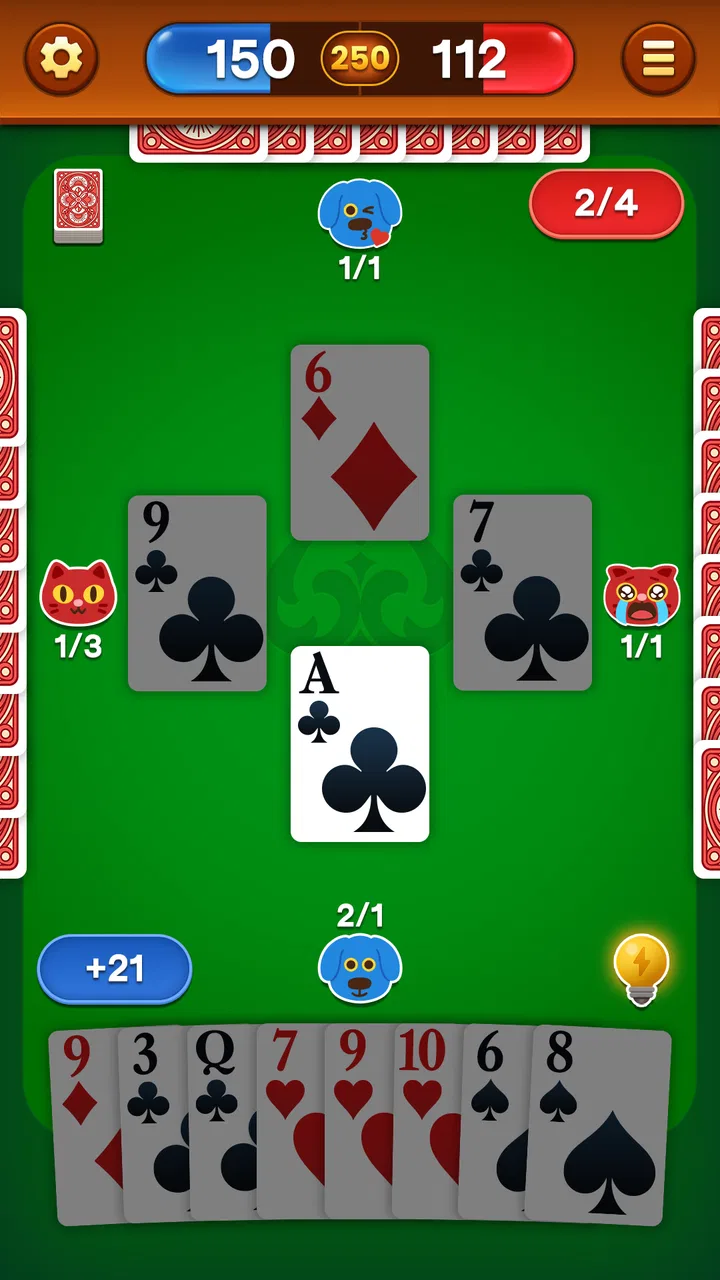
Spades is built around tricks, partnerships, and bidding. Before the cards are played, each player estimates how many tricks they can take. That estimate sets the tone for the hand. Bid too cautiously and I may miss a chance to gain ground; bid too aggressively and I risk failing to meet the target. Once play begins, the familiar structure takes over: follow the led suit when possible, and use a spade when the rules allow it and the moment is worth spending one.
The offline format makes this loop easy to revisit. I can focus on the decisions rather than on learning a complicated interface or managing a collection of cards and bonuses. For an experienced player, that directness is welcome. For someone new to Spades, it gives the basic logic room to become familiar through repetition.
My biggest advice for a new player would be to treat bidding as the central skill, not as a formality before the interesting part. The cards you hold are only half the story. You also need to think about how many spades you have, whether your long suits can produce tricks, and how likely your partner is to help cover the bid. Keeping track of which high cards have already appeared is more useful than playing every strong card as soon as possible.
Small decisions that make the offline mode more rewarding
A useful habit is to separate a hand into three questions. First, what can I probably win naturally? Second, which tricks might require a spade? Third, what cards could become dangerous if I keep them too long? This approach prevents me from spending a valuable trump simply because it is available. It also makes the game feel less random, even when the deal is uncomfortable.
Another practical tip is to watch the suit that has already been exhausted. Once a player cannot follow that suit, a spade may enter the trick. That moment changes the value of the remaining cards. I find that anticipating this shift is more reliable than trying to force a dramatic play early in the hand.
There is also a partnership lesson hidden in the format. If my partner has already shown that they can win a trick, I do not always need to overtake them. Holding back a higher card can preserve control for a later trick. Conversely, if the partnership still needs to reach its combined target, taking a safe trick may matter more than preserving a theoretically stronger card.
These details are not separate game modes or complicated systems. They are ways to get more out of the same core rules. That is why this app can suit both a quick casual session and a more thoughtful practice session. The game remains easy to start, but it does not become completely empty once the basic rules are understood.
The best everyday scenario is a short offline break
The clearest use case for me is travel. Imagine having a phone on a long journey, with no dependable signal and no interest in watching another video. A few hands of Spades give the break some structure. I can play until the next stop, pause naturally, and return later without needing to arrange a multiplayer session. The same applies to a lunch break, a quiet evening, or a waiting period where a full-length game would be too demanding.
It can also work well when friends already know the rules but do not have a physical deck nearby. One person can pass the device around for individual decisions, or the group can use the app as a quick substitute when the main goal is to remember how a hand might unfold. Still, I would not confuse that with true local multiplayer. The experience is better for taking turns with one device or for solo play than for replacing the conversation and shared visibility of a real table.
Who will enjoy this particular rhythm
Existing Spades players will probably understand the value quickly. The game gives them a portable way to practice bidding and card management without carrying a deck. It is also approachable for people who enjoy classic card games but do not want a large app filled with unrelated events, collections, or competitive layers.
New players can use it as a low-pressure introduction, provided they are willing to learn the logic of tricks and bids. Spades is not difficult because the controls are complicated; it is difficult because a seemingly harmless card can affect the partnership several tricks later. I like that the offline setting encourages patience. There is no need to chase a fast result when the useful part is understanding why a bid succeeded or failed.
Families may appreciate the Everyone rating and the simple premise, although younger players who have never played a trick-taking game may still need someone to explain the rules. The age rating makes it broadly accessible, but it does not automatically make the strategy intuitive. A short explanation of bidding, following suit, and trumping will make the first session much less confusing.
Where it compares well with other card-game choices
Compared with a physical deck, the app wins on portability and immediate setup. I do not need a table, enough space to sort cards, or a second person ready to deal. It also gives me a way to practice when nobody else is available. The physical deck remains better for social interaction, visible card handling, and the atmosphere of a shared game night.
Compared with online Spades platforms, this title’s advantage is independence from connectivity. That makes it a better choice for travel and quiet solo play. Online alternatives are usually more appealing when I specifically want human opponents, live competition, or a broader social environment. If my priority is testing myself against unpredictable people rather than playing whenever convenient, I would look beyond an offline-focused option.
Compared with broad card-game collections, this game is more focused. That can be a strength because I can open it knowing exactly what I am there to play. It can also feel limiting if I want several different games in one installation. Someone who regularly switches between solitaire, hearts, rummy, and Spades may prefer a collection, while a dedicated Spades player benefits from the narrower purpose here.
The friction I noticed before recommending it
The first limitation is inherent in the offline approach: the game cannot provide the social unpredictability of a live table by itself. Repeated sessions may become less surprising if I learn the patterns of the computer-controlled opponents. That does not make the game useless, but it changes its role. I see it as a practice tool and convenient pastime rather than a complete competitive community.
The second consideration is the free-to-play structure. The game is free to download and play, while in-app purchases range from $0.99 to $99.99 per item. That wide range is worth keeping in mind before spending anything. I would begin with the free experience and decide whether any optional purchase genuinely improves my routine. For a simple card game, paying should be a deliberate choice, not something I do automatically after a few hands.
A third limitation is that players looking for elaborate presentation may find the focused design too plain. Spades does not need spectacle to work, but some people want animated effects, extensive progression, or a strong competitive identity from a card app. If those elements are central to your enjoyment, a more feature-heavy alternative may suit you better.
Three practical ways to get more value from it
I’d use these three approaches to make each session more intentional: treat a hand as a chance to test one decision, keep play in manageable blocks, and use a visible round to help someone understand how Spades works. They suit different moods, from quiet practice to a casual introduction, and each gives the game a purpose beyond simply passing time.
Use it as a bidding practice tool
Instead of judging a session only by whether I win, I can review the quality of my bids. After a hand, I ask whether the estimate matched the cards I actually held and whether I ignored the risk of being short in a suit. This turns a casual offline game into a small exercise in decision-making. It is especially useful for players who understand the rules but often lose points through optimistic bidding.
Play in focused blocks rather than endless sessions
Because a hand has a natural beginning and end, I can use the game in short blocks. Playing a few hands with one goal—such as conserving spades or tracking high cards—keeps the experience fresh. This is better than playing mindlessly for a long period and repeating the same mistakes. The offline capability makes these small sessions easy to fit around travel or waiting time.
Explain the game while someone watches
For a beginner, watching a hand unfold can be more helpful than reading a long rules explanation. I can describe why I bid a certain number, why I followed a suit, and why I chose not to trump immediately. The app becomes a visual teaching aid, even if the actual match remains solo. This is a practical way to introduce Spades without needing a physical deck or a full group ready to play.
Who should install it, and who should choose something else
I would recommend this game to anyone who wants classic Spades in a convenient offline format. It is a good fit for travelers, casual card players, people learning the rules, and experienced players who want a quick practice session. The free entry point makes it easy to test, and the Everyone rating means it can suit a broad range of players.
I would be more cautious about recommending it to someone whose main goal is online competition. If you want live opponents, conversation, rankings, or a persistent multiplayer community, an online-focused Spades app will probably be a better match. Likewise, players who want a large collection of card games may find this focused title narrower than expected.
For me, the deciding question is simple: do you value being able to play whenever you have a spare moment, even without a connection? If the answer is yes, Mouse Games has made a sensible choice by keeping the experience centered on the card table rather than surrounding it with unnecessary complexity. If the answer is no, the offline capability will matter less, and the social advantages of another option may carry more weight.
My final impression is positive but specific. This is not a substitute for every kind of Spades experience, and it does not need to be. Its strength is making the core game available in situations where a physical deck or online match is inconvenient. I would install it for travel, quiet practice, and quick breaks, while keeping a physical deck or multiplayer alternative for a proper group game. That clear purpose is exactly what makes it worth trying.
FAQs for Spades - Classic Card Game
01What is Spades - Classic Card Game and how do you play it?
Spades - Classic Card Game is a traditional trick-taking card game where players aim to win a set number of tricks based on their initial bids. Typically played with four players in partnerships, the game uses a standard 52-card deck. Spades are always the trump suit, meaning they can override other suits. Strategy and teamwork are key to winning.
02Is Spades - Classic Card Game available for both Android and iOS devices?
Yes, Spades - Classic Card Game is available for both Android and iOS platforms. You can download it from the Google Play Store for Android devices and the Apple App Store for iOS devices. Ensure your device meets the app’s compatibility requirements for the best experience.
03Does Spades - Classic Card Game offer online multiplayer features?
Yes, the game offers online multiplayer features, allowing you to play with friends or compete against players from around the world. You can create private tables for friends or join public games. This feature enhances the interactive experience and provides a more engaging way to enjoy the game.
04Are there any in-app purchases or ads in Spades - Classic Card Game?
Spades - Classic Card Game may include in-app purchases and advertisements. While the core game is typically free, purchases can enhance gameplay by removing ads or unlocking additional features. Ads usually appear between games or rounds, but in-app purchases can provide an ad-free experience.
05What features make Spades - Classic Card Game unique or interesting?
Spades - Classic Card Game offers several features that add to its appeal, such as customizable avatars, various difficulty levels, and in-game chat options. Additionally, it often includes tutorials for beginners, detailed statistics to track progress, and seasonal events or challenges to keep gameplay fresh and exciting.
Pros
- Intuitive interface for easy gameplay.
- Supports both single and multiplayer modes.
- Customizable card decks and themes.
- Offline play available without internet.
- Regular updates with new features.
Cons
- Limited tutorial for beginners.
- Ads can be frequent and intrusive.
- No landscape mode for tablets.
- Occasional connectivity issues in multiplayer.
- In-app purchases can be pricey.

Spades - Classic Card Game
Gallery